
How to Use a CNC Machine: A Step-by-Step Guide for Precision Manufacturing
Learning how to use a CNC machine starts with proper preparation, safe setup, accurate programming, controlled machining, and careful inspection.
Updated September 2026To use a CNC machine, inspect and home the machine, secure the workpiece, load and measure the right tools, set the work offset, load and check the program, run a dry run, then machine the part while watching it and inspect the first piece before running the rest. Most bad parts trace back to setup, not the machine. We’ve seen how a loose clamp, wrong offset, or rushed setup can turn a good program into a bad result, which is why preparation matters before the machine ever starts cutting.
CNC machining is used to cut, mill, drill, bore, shape, and finish parts with controlled movement, making it valuable for industrial parts, prototypes, replacement components, and production work that needs accuracy and repeatability.
At C.L. Dews & Sons Foundry & Machinery in Hattiesburg, CNC machining sits under the same roof as our foundry and steel fabrication shop, supporting the kind of industrial work where small measurement errors can become expensive problems. That is why this guide does not just explain how to press start. It walks through how to use a CNC machine properly, from preparation and programming to machining, inspection, and knowing when a professional machine shop is the better option.
How CNC Machines Work
A CNC machine, or Computer Numerical Control machine, uses programmed commands to control how cutting tools move, cut, drill, or shape a part. Most CNC jobs start with a CAD design that defines the part’s shape, dimensions, holes, and required features. That design is then processed through CAM software and converted into G-code, which tells the machine exactly how to complete the job.
This sounds straightforward, but the details matter. A correct program can still fail if the workpiece is clamped poorly. The right material can still produce bad results if the wrong cutter is used. A CNC machine is powerful, but it is not magic. It follows instructions exactly, even when those instructions are wrong.
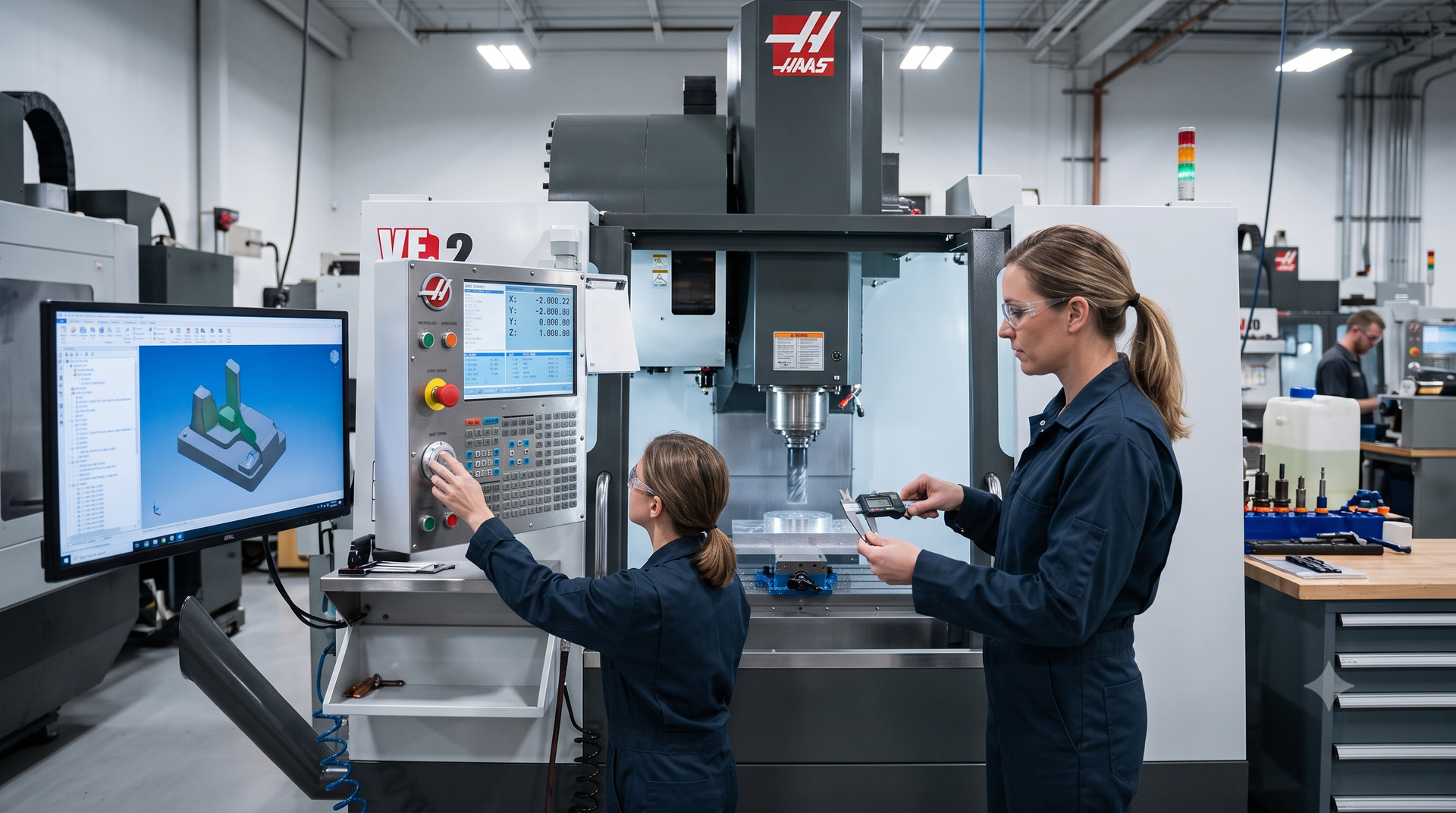
CNC machining depends on accurate setup, controlled movement, and careful inspection.
Know Which Type of CNC Machine You Are Using
The basic steps are the same on every CNC machine, but the setup details change with the machine type. Before learning the controls, know what kind of machine is in front of you and what it is built to do.
- CNC mills and machining centers: a rotating cutter moves across a clamped workpiece to cut faces, pockets, slots, and holes.
- CNC lathes: the workpiece spins while the cutting tool shapes shafts, bushings, bores, and threads.
- CNC plasma cutters: a plasma arc cuts profiles from steel plate and other conductive metals.
- CNC grinders: an abrasive wheel brings surfaces to a controlled flatness and finish.
- CNC routers: common in woodworking and hobby shops for wood, plastics, and softer materials.
Our machine shop runs CNC milling, turning, drilling and boring, plasma cutting, and grinding for foundry castings, steel fabrications, and standalone machining jobs. A desktop router and an industrial mill both follow G-code, but the workholding, cutting forces, and safety demands on an industrial machine are far higher.
Step 1: Preparing Your CNC Machine
Before using a CNC machine, check that the machine, tooling, program, and work area are ready. Make sure the machine has power, the control panel responds, and the area is clean. Remove chips, leftover material, broken tool fragments, or any debris that could affect movement, damage tools, or ruin the finished part.
Next, inspect the machine. Look for visible damage, loose fixtures, worn cutting tools, coolant issues, and unusual sounds during startup. If the machine requires warm-up, allow it to run through the proper warm-up cycle before precision work begins. This is especially important when tight tolerances are involved because machine components can shift slightly as temperature changes.
Then get familiar with the control before touching cycle start. Operating a CNC machine safely depends on knowing where every button and mode is. On most controls you will find:
- A home or reference return, usually run after power-up so the machine knows where its axes are
- Jog and handwheel modes for moving the axes by hand during setup
- MDI mode for entering single commands
- Edit mode for loading and checking programs
- Auto or memory mode for running a program
- Single block, feed override, and rapid override for slowing a new program down
- Feed hold and the emergency stop
Button names and screens differ between control brands, so read the manual for the specific machine and have an experienced operator walk you through it.
Safety checks should never be treated as paperwork. CNC machines involve rotating tools, moving parts, sharp edges, chips, sparks, and high cutting forces. OSHA’s machine guarding guidance explains that machine parts, functions, or processes that may cause injury should be safeguarded to protect operators and nearby workers.
Before running a job, confirm:
- Guards and doors are in place
- Emergency stop buttons are accessible
- The work area is clear
- The correct program is loaded
- The correct material is prepared
- The right tool is installed
- Coolant or lubrication is ready if required
- The operator understands the job setup
One practical shop insight: the most dangerous CNC mistakes are often boring ones. It is not always a dramatic programming failure. Sometimes it is a loose clamp, the wrong offset, a dull tool, or someone assuming the previous setup is still correct. Good CNC work depends on disciplined checks before the machine starts cutting.
Step 2: Setting Up the Workpiece and Tools
Once the machine is ready, the next step is setting up the workpiece and cutting tools. This stage has a major effect on accuracy, finish quality, and safety.
The workpiece must be secured properly so it does not move during machining. Depending on the part, this may require a vise, clamps, jaws, fixtures, plates, or custom workholding that holds the material firmly without distorting it. For heavy, irregular, or industrial metal parts, proper support is even more important because poor workholding can cause vibration, shifting, inaccurate cuts, or damaged components.
Tool selection also matters. A milling cutter, drill, boring bar, turning tool, or grinding tool must match the material and the operation. Steel, stainless steel, aluminum, cast iron, and specialty alloys do not all behave the same way under cutting pressure. The wrong tool can cause chatter, poor surface finish, heat buildup, tool breakage, or inaccurate dimensions.
When setting up tools, check:
- Tool type
- Tool diameter
- Tool length
- Tool condition
- Tool holder security
- Cutting edge wear
- Coolant requirements
- Required spindle speed and feed rate
After the material and tools are installed, the machine needs a reference point. This is often called setting zero, setting the origin, or establishing the work coordinate system. The CNC machine must know where the workpiece sits so the programmed toolpaths line up with the real material.
If the zero point is wrong, everything after it is wrong. A program can be perfect on screen and still cut into the wrong location if the work offset is incorrect.
Setting Up a Casting Instead of Bar Stock
Many CNC guides assume a squared block of bar stock. Many of the parts that reach our CNC machines start as castings poured in our own foundry, and castings need a different approach. A raw casting has draft angles, parting lines, and surfaces that are not square to each other, so it will not sit flat in a vise or give a clean edge to pick up for zero.
The fix starts at the design stage. Castings should be given agreed location points that the machinist uses for pickup, workholding, and dimensional checks, so every part in a run is located the same way. On large castings and flame-cut plate, Blanchard grinding a face flat before CNC machining gives the following operations a true reference surface to clamp against and measure from.
Step 3: Programming the CNC Machine
Programming is where the design is turned into a controlled machining process. In most workflows, CAD software defines the part’s shape and dimensions, while CAM software decides how the machine will cut it. The CAM process selects tools, creates toolpaths, sets cutting depths, feed rates, and spindle speeds, then generates the G-code the CNC machine follows.
G-code controls movements such as:
- Rapid positioning
- Linear cutting
- Circular cutting
- Tool changes
- Spindle speed
- Feed rate
- Coolant commands
- Drilling cycles
- Program stops
Machine functions such as starting the spindle, turning coolant on, and ending the program are usually handled by M-codes, which sit alongside the G-code movement commands.
Before loading the program into the machine, the code and toolpaths should be reviewed. Many CAM systems include simulation tools that show how the machine will move and where material will be removed. Simulation helps identify obvious problems before the job reaches the machine.
Important programming checks include:
- Correct units, such as inches or millimeters
- Correct material dimensions
- Correct work coordinate system
- Correct tool numbers
- Safe clearance heights
- Proper cutting depth
- Collision risks
- Toolpath order
- Feed and speed settings
For beginners learning how to use a CNC machine, this is where many mistakes happen. They focus on getting the shape right but overlook the cutting strategy. A part is not only defined by its geometry. It is also defined by how it is machined, how much material is removed per pass, how heat is controlled, and how the tool enters and exits the cut.
On our prototype machining work, the first step is a review of the CAD files or drawings to catch manufacturability problems before any toolpaths are written. Fixtures and workholding are then planned around each part’s geometry, so the program and the setup are designed together rather than separately.
For businesses that need accurate metal parts without managing programming, tooling, and setup internally, we provide professional CNC machining services for custom components, prototypes, and precision-machined parts.
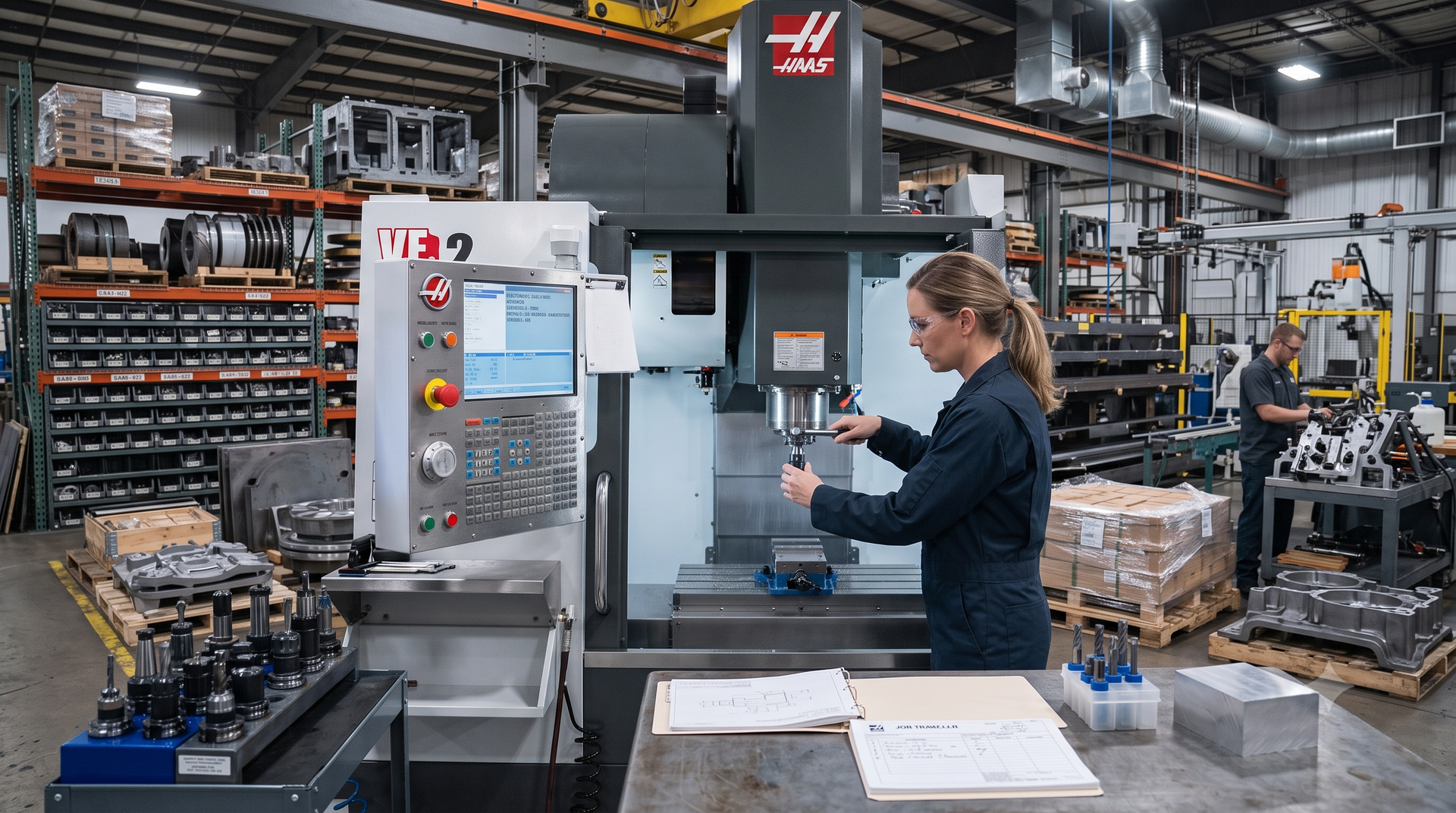
Correct tooling, workholding, and machine setup are critical before running the CNC program.
Step 4: Running a Test Cycle
A test cycle helps confirm that the CNC program and setup are safe before the machine cuts the actual part. This step should not be skipped, especially when the job involves a new setup, expensive material, tight tolerance, or complex geometry.
A dry run allows the operator to watch machine movement without cutting the workpiece. Depending on the machine and setup, the operator may run the program above the part, slow the feed rate, or use simulation features to verify the path. The purpose is to catch errors before they become scrap or machine damage.
During a test cycle, check for:
- Tool clearance
- Clamp clearance
- Correct tool changes
- Correct spindle direction
- Correct starting point
- Safe rapid movements
- Unexpected toolpath behavior
- Proper coolant activation
- Program stops or alarms
The operator should also confirm that the tool will not collide with the vise, fixture, clamps, table, or machine enclosure. A collision can damage the tool, machine spindle, workholding, and workpiece. In production work, one collision can also create downtime that costs far more than the damaged material.
This is also the right time to check the first few movements carefully. If the tool moves in the wrong direction or approaches the part too aggressively, stop the program and correct the issue. Do not assume the machine will “figure it out.” CNC machines do exactly what they are told.
Step 5: Executing the CNC Machining Process
After setup and testing, the operator can start the CNC machining process and monitor the machine as it cuts the part. Even though the process is automated, the machine should still be watched closely during the cycle. Unusual vibration, excessive noise, smoke, poor chip formation, coolant issues, or sudden tool wear can all signal a problem.
During machining, monitor:
- Spindle load
- Tool wear
- Cutting sound
- Vibration or chatter
- Coolant flow
- Chip evacuation
- Surface finish
- Heat buildup
- Machine alarms
- Part movement
Feeds and speeds are especially important. Feed rate controls how quickly the tool moves through the material. Spindle speed controls how fast the tool or workpiece rotates. If these settings are too aggressive, the tool may overheat, chatter, or break. If they are too conservative, the job may take too long or produce poor chip formation.
Coolant and lubrication also play a major role. They help manage heat, reduce friction, improve tool life, and support better surface finish. Not every material or machining operation uses coolant the same way, so the setup should match the job requirements.
Metal CNC machining requires particular care because metal parts often need stronger tools, stable workholding, and accurate cutting conditions. For projects involving metal components, fabrication accuracy, or complex industrial requirements, we also provide metal CNC machining solutions that support precision fabrication and part production.
Step 6: Post-Machining Inspection and Quality Control
The job is not finished when the machine stops cutting. Inspection confirms whether the finished part meets the required dimensions, surface finish, and performance expectations.
Start by removing chips and cleaning the part carefully. Then inspect visible features such as holes, edges, slots, faces, threads, and machined surfaces. Look for burrs, tool marks, chatter, poor finish, incomplete cuts, or heat-related discoloration.
Dimensional inspection may involve:
- Calipers
- Micrometers
- Bore gauges
- Thread gauges
- Height gauges
- Dial indicators
- Coordinate measuring machines
- Surface finish checks
The first completed part should be inspected before continuing with the rest of the job. This confirms that the program, setup, tooling, and offsets are producing the correct result. If the part is outside tolerance, the operator must identify the cause, such as tool wear, incorrect offsets, poor clamping, thermal movement, programming errors, material movement, or measurement mistakes.
For the prototypes we machine, every part goes through dimensional inspection with calibrated instruments and ships with an inspection report, so the customer can check the part against the original design intent.
Inspection should also consider function, not only dimensions. A part may measure correctly in one area but still fail if the surface finish is poor, a mating surface is not flat, or a hole alignment issue affects assembly. For industrial components, the final part must fit and perform reliably in the equipment it supports.
Need Precision CNC Machining for Industrial Parts?
C.L. Dews & Sons Foundry & Machinery supports custom components, prototypes, replacement parts, and industrial metal machining projects.
Explore our CNC Machining SupportCommon CNC Machining Applications
CNC machining is used in many industries because it can produce consistent parts from digital designs. Its best applications depend on the material, part requirements, and intended use. For Dews Foundry, CNC machining is especially useful for industrial components, foundry-related machining, custom fabrication, and replacement parts for demanding applications.
| Industry | CNC Machining Use | Why It Matters |
|---|---|---|
| Mining and aggregate | Wear parts, replacement components, equipment parts | Parts must handle abrasion, impact, and heavy use. |
| Recycling | Crusher parts, machine components, repair parts | Downtime can be expensive when equipment fails. |
| Construction | Structural and equipment-related components | Strength, fit, and repeatability are critical. |
| Manufacturing | Custom machine parts, fixtures, tooling, production components | Accurate parts help keep operations consistent. |
| Oil and gas | Industrial metal components and repair parts | Parts often need durability and dependable performance. |
| Infrastructure and transportation | Fabricated and machined components | Proper fit and long-term reliability matter. |
CNC machining can also support prototyping. A business may need one part to test fit, function, or performance before ordering a larger run. This helps reduce risk before full production.
Key Advantages of CNC Machining
CNC machining offers several advantages when the job requires accuracy, repeatability, and controlled production.
Precision
CNC machines can produce parts with consistent dimensions when the setup, tooling, and program are correct.
Repeatability
Once a program and setup are proven, the machine can repeat the same process across multiple parts.
Efficiency
CNC machining can reduce manual handling and speed up production for suitable parts.
Versatility
CNC machines can support milling, drilling, boring, turning, cutting, and finishing operations.
Safer Operation When Properly Controlled
CNC machines can reduce direct contact with cutting, but they still require guarding, training, setup, and monitoring.
Better Support for Custom Parts
CNC machining can help produce custom components based on drawings, samples, or project requirements.
Common Mistakes to Avoid When Using a CNC Machine
Anyone learning how to use a CNC machine should understand the most common mistakes before starting.
Poor Workholding
If the workpiece moves, the part is likely ruined. Worse, the tool or machine may be damaged.
Incorrect Zero Point
A wrong work offset can cause the machine to cut in the wrong location. Always verify the origin.
Skipping the Dry Run
Skipping the test cycle may save a few minutes, but it can cost hours in repairs, scrap, and downtime.
Using the Wrong Tool
The wrong tool can create poor finish, tool breakage, inaccurate cuts, or overheating.
Ignoring Tool Wear
A worn tool may still cut, but it may produce bad dimensions, rough surfaces, or excess heat.
Running the Wrong Program
Confirm the file name, revision, material, setup, and tool list before machining.
How to Learn CNC Machining
Most people learn how to work a CNC machine through a mix of training and supervised time at the machine. Pressing cycle start on a proven job is quick to learn. Setting up a new job, choosing tools, and recognizing when a cut sounds wrong take much longer and only come from practice.
A practical learning path looks like this:
- Learn to read engineering drawings, tolerances, and units
- Learn to measure with calipers, micrometers, and indicators
- Learn shop safety and machine guarding
- Learn how different materials behave when cut, including feeds and speeds
- Learn G-code basics so you can read and edit a program at the control
- Practice CAM programming and simulation on simple parts
- Run jobs under an experienced machinist before running them alone
Community college and technical school machining programs, manufacturer training on a specific control, and apprenticeships inside a working shop are all common routes. Manual machining experience also helps, because it teaches how a cutter behaves in metal before a program is doing the moving.
When to Use a Professional CNC Machine Shop
Knowing how to use a CNC machine is useful, but not every project should be handled in-house. Professional machining is often the better choice when the part is complex, the tolerance is tight, the material is expensive, or the component affects equipment performance.
You should consider a professional CNC machine shop when:
- The part requires tight tolerances
- The material is difficult to machine
- The part is large, heavy, or irregular
- The job requires custom fixtures
- The component must fit existing equipment
- The part needs repeat production
- The project involves metal fabrication or foundry work
- Downtime from a failed part would be costly
For industrial parts, experience matters. A machine shop does more than run equipment. It reviews drawings, chooses practical machining methods, plans workholding, manages inspection, and understands how the finished part will be used.
Final Thoughts on Using a CNC Machine Correctly
Learning how to use a CNC machine means understanding the full process, not just the controls. Good CNC work depends on preparation, safe setup, proper tooling, accurate programming, careful testing, controlled machining, and final inspection. For industrial metal parts, custom components, prototypes, and replacement parts, professional CNC machining can save time, reduce risk, and improve final part quality.
C.L. Dews & Sons Foundry & Machinery supports businesses that need dependable machining, fabrication, and foundry capabilities for demanding applications. If your project requires precision-machined metal parts or custom industrial components, working with an experienced machine shop can make the difference between a part that simply looks finished and a part that performs correctly in the field.
Frequently Asked Questions
Do I need programming skills to operate a CNC machine?
Basic programming knowledge helps, especially if you need to understand G-code, toolpaths, offsets, and machine commands. However, many CNC workflows use CAD/CAM software to generate the program. Operators still need to understand setup, safety, tooling, and inspection.
How do I prepare a CNC machine for use?
Prepare the machine by cleaning the work area, checking guards, inspecting tools, confirming the correct program, securing the workpiece, setting the work offset, and running a test cycle before cutting the final part.
What are the most common beginner mistakes?
Common beginner mistakes include poor clamping, incorrect zero points, wrong tool selection, skipped dry runs, incorrect feeds and speeds, and failure to inspect the first finished part.
Can I damage a CNC machine if I use it incorrectly?
Yes. Incorrect setup, wrong offsets, poor workholding, excessive cutting forces, or tool collisions can damage the tool, workpiece, fixture, spindle, or machine. This is why setup checks and test cycles are important.
What type of CNC machine is best for beginners?
Desktop CNC routers or small entry-level milling machines are often easier for beginners to learn on. Industrial CNC machines require more training because they involve higher cutting forces, more complex controls, heavier materials, and stricter safety requirements.
How hard is it to learn to use a CNC machine?
Running a proven program on a machine someone else has set up is not hard to learn. The harder part is everything before cycle start: reading the drawing, holding the part, choosing tools, setting offsets, and proving out a new program. Those skills build over time with supervised practice, and industrial machines demand more training than desktop machines because the cutting forces and the cost of a mistake are much greater.
Is CNC harder than 3D printing?
Usually, yes. 3D printing is additive: the printer builds a part layer by layer, and setup is mostly preparing the file and the build plate. CNC machining is subtractive: it cuts material away from solid stock, so the operator also has to manage workholding, tool selection, feeds and speeds, offsets, and cutting forces. In exchange, CNC machining works in steel, cast iron, and other engineering metals and can hold the tolerances and surface finishes that industrial parts need.
How can a CNC machine be used?
A CNC machine can mill, turn, drill, bore, cut, and grind parts from a digital program. Shops use them for prototypes, replacement parts, production runs, and finishing castings and fabrications. The applications section above shows how different industries use CNC machining.
When should I hire a CNC machine shop instead of machining the part myself?
Hire a professional CNC machine shop when the part requires tight tolerances, metal machining, custom fixtures, complex geometry, repeat production, or reliable performance in industrial equipment.
Need Custom CNC Machining for Metal Parts?
Work with C.L. Dews & Sons Foundry & Machinery for CNC machining, fabrication, and industrial component support built around real-world performance.
Talk to Our Team Today
